
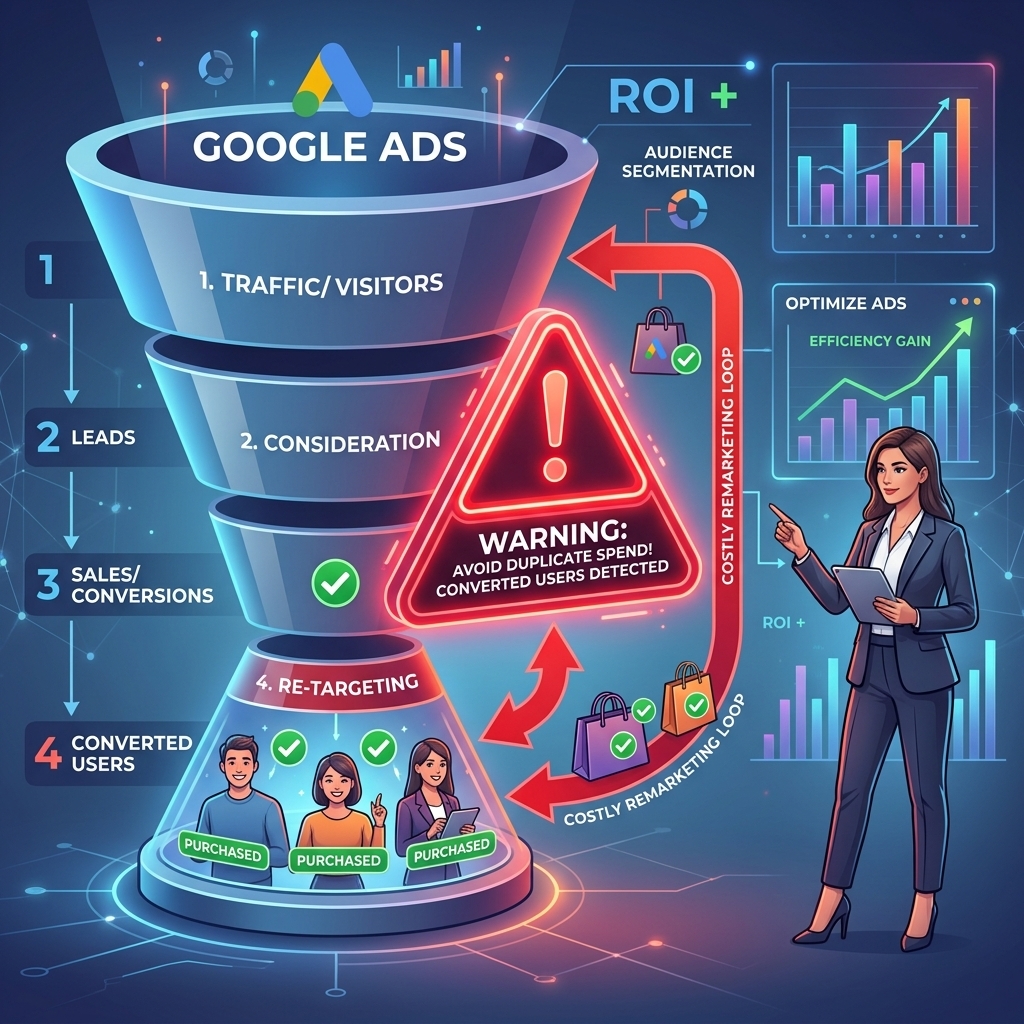
Most advertisers waste 30-40% of their Google Ads remarketing budget targeting users who have already converted or are no longer interested. This inefficiency directly impacts ROI, turning a powerful strategy into a money sink. Google Ads remarketing, when executed precisely, transforms lukewarm leads into high-value customers by re-engaging them at critical points in their journey. This guide will walk you through building high-converting audiences, strategizing effective campaigns, implementing advanced optimization tactics, and avoiding common pitfalls to maximize your return on ad spend.
What is Google Ads Remarketing and Why It Matters
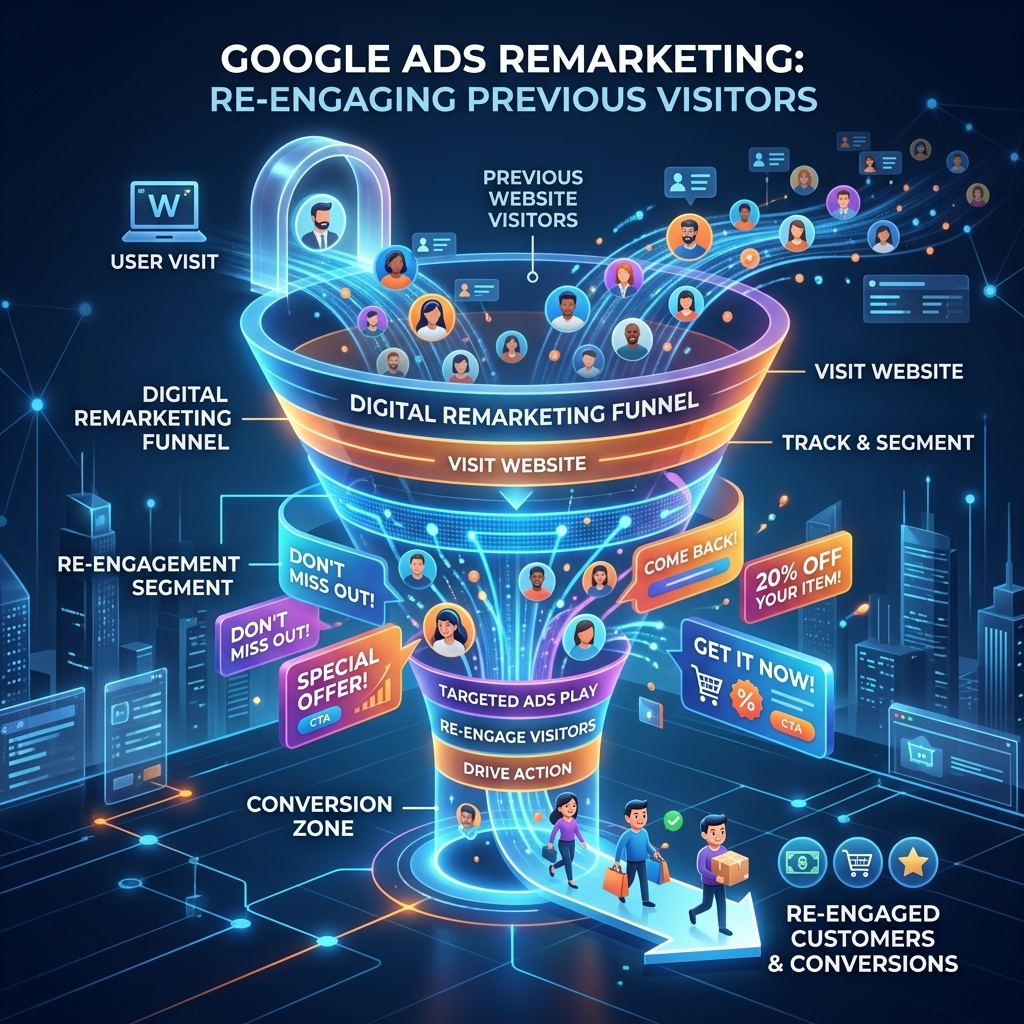
Google Ads remarketing leverages user engagement by displaying targeted advertisements to individuals who have previously interacted with your brand. Google Ads remarketing, often called retargeting, is a powerful strategy that re-engages potential customers across the Google Display Network, YouTube, Gmail, and Google Search. It significantly boosts conversion rates by serving highly relevant ads to an audience already familiar with your offerings, reducing the cost per acquisition (CPA) compared to cold traffic campaigns. Our campaigns consistently show a 2x to 3x higher conversion rate for remarketing audiences compared to cold traffic, underlining its importance in a full-funnel strategy.
Effective Google Ads remarketing goes beyond simple re-engagement; it nurtures leads, reinforces brand recall, and provides a second chance to convert users who might have been distracted during their initial visit. This mechanism directly addresses the reality that most first-time visitors do not convert immediately. By strategically bringing them back, remarketing campaigns bridge the gap between initial interest and final conversion. Understanding the fundamental types of audiences you can build is the next step to harnessing this power.
Building High-Converting Google Ads Remarketing Audiences
Building high-converting Google Ads remarketing audiences starts with precise segmentation based on user behavior and intent. Google Ads remarketing audiences are segments of users categorized by their interactions with your website, app, YouTube channel, or even customer data. Properly segmented audiences yield significantly higher engagement and lower CPCs because the ads served are hyper-relevant to the user’s previous interaction. A client recently achieved a 40% lower CPA by segmenting website visitors based on product page views versus generic homepage visits, demonstrating the power of granular audience creation.
Here are critical Google Ads remarketing audience types to leverage:
- Website Visitors: This is the most common and fundamental audience.
- All Visitors: Broad, but useful for brand awareness.
- Specific Page Viewers: Target users who visited high-intent pages (e.g., pricing, specific product pages).
- Cart Abandoners: Users who added items to their cart but did not complete the purchase. This segment often has the highest conversion potential.
- Time Spent on Site: Target users who spent a significant amount of time, indicating higher interest.
- App Users: For businesses with mobile applications, target users based on app installs, in-app actions, or time spent in the app.
- Customer Match: Upload your customer email lists to Google Ads. This allows you to target existing customers for upsells/cross-sells or exclude them from certain campaigns. You can also target leads who haven’t converted yet.
- YouTube Viewers: Target users who watched specific videos, subscribed to your channel, or interacted with your YouTube content. This is powerful for video-first strategies.
- Similar Audiences: Google can automatically generate audiences similar to your existing remarketing lists, expanding your reach to new, relevant users.
To maximize performance, combine these audience types with time durations (e.g., “website visitors in the last 30 days”). The more specific your audience, the more tailored your ad copy and offers can be, leading to better results. Once your audiences are defined, the next critical step is to strategize how to reach them effectively through specific campaign types.

Strategizing Your Google Remarketing Campaigns for Maximum Impact
Strategizing your Google remarketing campaigns involves selecting the right ad formats and platforms to re-engage your segmented audiences. Google remarketing campaigns are designed to re-engage users with relevant ads across Google’s vast network, guiding them back towards conversion. A well-defined strategy ensures budget efficiency and optimal reach, preventing ad fatigue while maximizing conversion opportunities. I’ve seen RLSA campaigns drive a 15-20% higher CTR than standard search campaigns for high-intent keywords, showcasing the strategic advantage of retargeting on search.
Consider these campaign types for your Google Ads remarketing strategy:
- Standard Display Remarketing: These campaigns show image or HTML5 ads to your remarketing audiences across millions of websites and apps on the Google Display Network. They are excellent for brand recall and visual re-engagement.
- Dynamic Remarketing: This is a powerful subset of display remarketing, especially for e-commerce. Dynamic remarketing campaigns automatically show users ads featuring the exact products or services they viewed on your site. This highly personalized approach significantly boosts conversion rates.
- Video Remarketing: Target users who have interacted with your YouTube channel or specific videos. These campaigns serve video ads on YouTube and across the Google Display Network, ideal for complex products or brand storytelling.
- Remarketing Lists for Search Ads (RLSA): This unique campaign type allows you to customize your search ads for people who have previously visited your site while they are searching on Google. You can bid higher for these users, show them different ad copy, or even target them for keywords you wouldn’t typically bid on for cold traffic.
Beyond campaign type, bidding strategy is crucial. For remarketing, focus on conversion-based strategies like Target CPA (Cost Per Acquisition) or Maximize Conversions. These strategies leverage Google’s machine learning to optimize for conversions within your budget, which is highly effective for audiences already showing intent. Understanding these strategic choices is vital before diving into the practical setup of your campaigns.

Implementing Google Ads Remarketing: A Step-by-Step Guide
Implementing Google Ads remarketing requires proper setup of your Google Ads account and website tracking to ensure accurate data collection. The implementation process involves technical setup, audience configuration, and campaign creation within the Google Ads platform. Correct implementation ensures accurate data collection and audience building, which are foundational for any successful remarketing effort. Advertisers using a verified agency ad account from AdShift can often expedite initial account setup and bypass some common new account hurdles, allowing for quicker implementation of these critical tracking elements.
Follow these steps to set up your Google Ads remarketing campaigns:
- Install the Global Site Tag (GTAG.js) or Link Google Analytics:
- Global Site Tag: Go to your Google Ads account, navigate to “Tools and Settings” > “Shared Library” > “Audience Manager” > “Audience sources.” Set up the “Google Ads tag” by installing the provided code snippet on every page of your website, ideally within the
<head>section. - Google Analytics: If you use Google Analytics, link your Google Analytics 4 (GA4) property to your Google Ads account. This allows you to import audiences directly from GA4. (For more on foundational Google Ads setup, refer to our Google Ads complete guide).
- Global Site Tag: Go to your Google Ads account, navigate to “Tools and Settings” > “Shared Library” > “Audience Manager” > “Audience sources.” Set up the “Google Ads tag” by installing the provided code snippet on every page of your website, ideally within the
- Configure Your Audience Source:
- In “Audience Manager” > “Audience sources,” ensure your website tag or Google Analytics property is active and collecting data. This is where Google collects the information needed to build your remarketing lists.
- Create Your Remarketing Audiences:
- Within “Audience Manager” > “Your data segments,” click the blue plus button to create a new segment.
- Website visitors: Define rules based on URL, time spent, specific page views, or events. For example, “Visitors of a page” > “URL contains /product-xyz” or “Visitors of a page who did not visit another page (e.g., /thank-you).”
- Customer list: Upload a CSV file of customer emails.
- YouTube users: Link your YouTube channel and create audiences based on video views or channel interactions.
- Set appropriate membership durations (e.g., 30, 90, 180 days).
- Create a New Google Ads Campaign:
- Go to “Campaigns” in Google Ads and click the plus button to create a new campaign.
- Choose a goal like “Sales” or “Leads” and then select a campaign type (e.g., “Display” for image/dynamic ads, “Search” for RLSA, “Video” for YouTube).
- Select “Standard Display campaign” or “Smart Display campaign” based on your preference.
- Target Your Remarketing Audiences:
- In your new campaign’s ad group settings, navigate to “Audiences.”
- Under “How they have interacted with your business,” browse and select the specific remarketing audiences you created in step 3.
- Design Your Ads:
- For Display campaigns, upload responsive display ads (images, logos, headlines, descriptions) or create dynamic ads linked to your product feed.
- For RLSA, craft compelling search ad copy that speaks directly to returning visitors.
- Set Bids and Budget:
- Choose a bidding strategy (e.g., Target CPA, Maximize Conversions) and set your daily budget.
- Start with a conservative budget and scale up as performance dictates.
Once your campaigns are live, the focus shifts to continuous refinement. This leads us directly into advanced optimization tactics that will elevate your remarketing performance.

Advanced Optimization Tactics for Google Ads Remarketing
Advanced optimization tactics for Google Ads remarketing focus on refining audience targeting and ad delivery to squeeze out maximum efficiency and ROI. Optimization in remarketing involves continuous adjustments based on performance data, aiming to reduce wasted spend and increase conversion rates. These tactics drive down costs and push conversion rates higher, turning good campaigns into exceptional ones. Our campaigns show that excluding converters can reduce wasted spend by 25-30%, a direct impact on profitability.
Implement these strategies to optimize your Google Ads remarketing:
- Aggressive Exclusion Lists: This is non-negotiable.
- Exclude Converters: Immediately exclude users who have completed your desired conversion (e.g., purchased, signed up). This prevents wasted impressions and budget on users who no longer need to be persuaded.
- Exclude Bounced Users: For some campaigns, exclude users who spent very little time on your site (e.g., <5 seconds) if they are unlikely to convert.
- Exclude Irrelevant Pages: If you have blog posts or support pages, exclude visitors to these pages from product-focused remarketing.
- Frequency Capping: Prevent ad fatigue by limiting how many times a user sees your ad. I recommend starting with 3-5 impressions per user per day for Display campaigns. Excessive frequency leads to annoyance and diminishing returns.
- Bid Adjustments by Device, Location, and Time: Analyze your performance reports. If conversions are higher on mobile, increase mobile bids. If certain hours or geographical areas perform better, adjust bids accordingly.
- A/B Test Ad Creatives and Copy: Continuously test different headlines, descriptions, images, and calls-to-action. What resonates with a first-time visitor might not be effective for a returning one. Personalize the message to acknowledge their previous visit.
- Audience Layering and Segmentation: Combine remarketing lists with other targeting methods (e.g., demographics, in-market audiences) to create even more refined segments. For example, “cart abandoners who are also in-market for a related product.”
- Negative Keywords (for RLSA): Just as with standard search campaigns, use negative keywords in your RLSA campaigns to prevent your ads from showing for irrelevant searches.
- Ad Rotation Optimization: Set your ad rotation to “Optimize: Prefer performing ads” to allow Google to show the best-performing creatives more often.
- Leverage AdShift Agency Accounts for Scale: For advertisers looking to scale without hitting spending limits or facing account suspensions, renting a verified Google Ads agency account from AdShift can provide the stability and higher limits necessary to implement aggressive optimization strategies across multiple campaigns without interruption. Our premium accounts come with established histories and higher trust scores, ideal for demanding remarketing efforts.
By systematically applying these advanced optimization tactics, you can transform your Google Ads remarketing campaigns into highly efficient conversion machines. Even with the best tactics, common mistakes can derail progress, which brings us to our next crucial section.

Avoiding Costly Google Ads Remarketing Mistakes
Avoiding costly Google Ads remarketing mistakes is crucial for maintaining campaign profitability and maximizing your ad spend. Common mistakes in Google Ads remarketing often stem from poor audience management, inadequate creative strategy, or neglecting essential optimization features. Rectifying these errors can salvage budgets and improve performance significantly, turning underperforming campaigns around. A client recently saved $1,500/month by implementing proper conversion exclusions, redirecting that budget to higher-performing segments.
Here are the most common and costly Google Ads remarketing mistakes to avoid:
- Not Excluding Converted Users: This is the number one budget killer. If you don’t exclude users who have already purchased or completed your desired action, you’re paying to show ads to people who have already converted. Always set up an exclusion list for “all converters.”
- Overly Broad or Undersized Audiences:
- Too Broad: Targeting “all website visitors” with the same generic ad can be inefficient. Segment audiences based on intent (e.g., product page visitors vs. blog readers).
- Too Small: If your audience is too small (e.g., <100 active users for Display, <1,000 for Search), Google Ads might not be able to run campaigns effectively due to privacy thresholds.
- Neglecting Frequency Capping: Showing the same ad to the same person dozens of times leads to ad fatigue and negative brand perception. Implement frequency caps (e.g., 3-5 impressions/day/campaign).
- Poor Ad Creative and Messaging: Generic or uninspiring ads will fail to re-engage users. Your remarketing ads should acknowledge the user’s previous interaction and offer a clear, compelling reason to return. A/B test different creatives and calls-to-action.
- Ignoring Negative Keywords (for RLSA): Just like regular search campaigns, RLSA campaigns need negative keywords. Without them, your ads could show for irrelevant searches, wasting budget.
- Lack of Segmentation by Purchase Stage: Treating a cart abandoner the same as someone who visited your “About Us” page is a mistake. Tailor your message and offer to their specific stage in the buying journey.
- Incorrect Tracking Tag Implementation: If your Google Ads tag or Google Analytics is not properly installed or configured, your audiences won’t build correctly, and your campaigns won’t run. Regularly verify your tag’s functionality.
- Setting It and Forgetting It: Remarketing campaigns require continuous monitoring and optimization. Performance fluctuates, and what worked last month might not work today. Regularly review metrics and adjust bids, creatives, and audiences.
By actively avoiding these common pitfalls, you position your Google Ads remarketing campaigns for sustained success and significantly higher ROI.
Frequently Asked Questions About Google Ads Remarketing
What is Google Ads remarketing?
Google Ads remarketing, also known as retargeting, is a powerful digital advertising strategy that displays targeted advertisements to users who have previously interacted with your website, app, or content. It leverages data from these past interactions to re-engage potential customers, reminding them of your offerings and guiding them back to complete a desired action, such as a purchase or signup. This strategy is highly effective because it targets an audience already familiar with your brand, leading to higher conversion rates and lower acquisition costs.
How do I set up Google Ads remarketing?
Setting up Google Ads remarketing involves a few critical steps. First, ensure your Google Ads account is linked to Google Analytics or has the Global Site Tag installed on your website to collect visitor data. Next, configure your audience sources within Google Ads’ Audience Manager. Then, create specific remarketing audiences based on user behavior (e.g., website visitors, specific page views, cart abandoners). Finally, create a new campaign in Google Ads, select a remarketing audience for targeting, choose your ad formats (display, video, search), and set your bids and budget.
What are the best Google Ads remarketing audiences?
The best Google Ads remarketing audiences are highly segmented and reflect specific user intent. Top-performing audiences include: website visitors who viewed product pages but didn’t convert, users who added items to a cart but abandoned it, customers who made a purchase (for cross-sell/upsell), users who watched a significant portion of your YouTube videos, and customer match lists of existing clients or leads for specific offers. Precise segmentation allows for highly relevant ad messaging, leading to higher engagement and conversion rates.
How can I improve my Google Ads remarketing ROI?
To improve your Google Ads remarketing ROI, focus on several key areas: implement aggressive exclusion lists (especially for recent converters) to prevent wasted spend, use frequency capping to prevent ad fatigue (e.g., 3-5 impressions/day), A/B test ad creatives and copy rigorously to find what resonates best, bid strategically based on the value of each audience segment, and segment audiences as granularly as possible. Regularly analyze performance metrics like CPA and ROAS to identify and scale successful segments while pausing underperforming ones.
Why is my Google Ads remarketing not working?
Google Ads remarketing campaigns might underperform for several reasons. Common issues include: not excluding converted users (leading to wasted budget), overly broad or undersized audience segments, poor ad creative that fails to re-engage, insufficient frequency capping leading to ad fatigue, incorrect tracking tag implementation preventing audience build-up, or bidding strategies that don’t align with your campaign goals. Reviewing these areas, ensuring proper setup, and optimizing based on data is essential for improving performance.
Conclusion
Google Ads remarketing is not just an option; it’s a fundamental pillar of any high-performing digital advertising strategy. By understanding how to build precise audiences, strategize effective campaigns, implement advanced optimization tactics, and diligently avoid common mistakes, you can significantly boost your conversion rates and achieve a superior ROI. The power to re-engage interested users is immense, transforming casual browsers into loyal customers.
Ready to unlock the full potential of your Google Ads remarketing campaigns? Rent a verified Google Ads agency account from AdShift and skip the spending limits and verification delays, allowing you to focus on building and optimizing your high-converting remarketing funnels immediately.